
In Short
Staffing agency timesheet software turns approved contractor hours into accurate payroll and client invoices. Many firms still run timesheets through email and spreadsheets, and every manual handoff adds errors. The result is late invoices, unbilled overtime, and payroll disputes, while the firm carries payroll for 30 to 90 days before clients pay. Asymbl Time keeps time data and placement data together with Recruiter Suite, so approved hours reach payroll and billing at the right rates.
Introduction
Staffing agency timesheet software captures contractor hours, routes them to the client for approval, and turns approved time into payroll and invoices at the right pay and bill rates. For a staffing firm, the hardest part of that job starts after the hours are logged.
Your firm often carries contractor payroll for 30 to 90 days before the client pays, and every timesheet that arrives late, carries the wrong rate, or waits for a signature stretches that gap.
Many ops teams still chase timesheets through email and spreadsheets, and each manual step adds an error that delays billing or starts a payroll dispute.
Below, you'll see where manual time processes cost your firm revenue, what to evaluate in timesheet software, and how time data guides redeployment and margin decisions.
Why Staffing Firms Need More Than Basic Timesheet Tracking
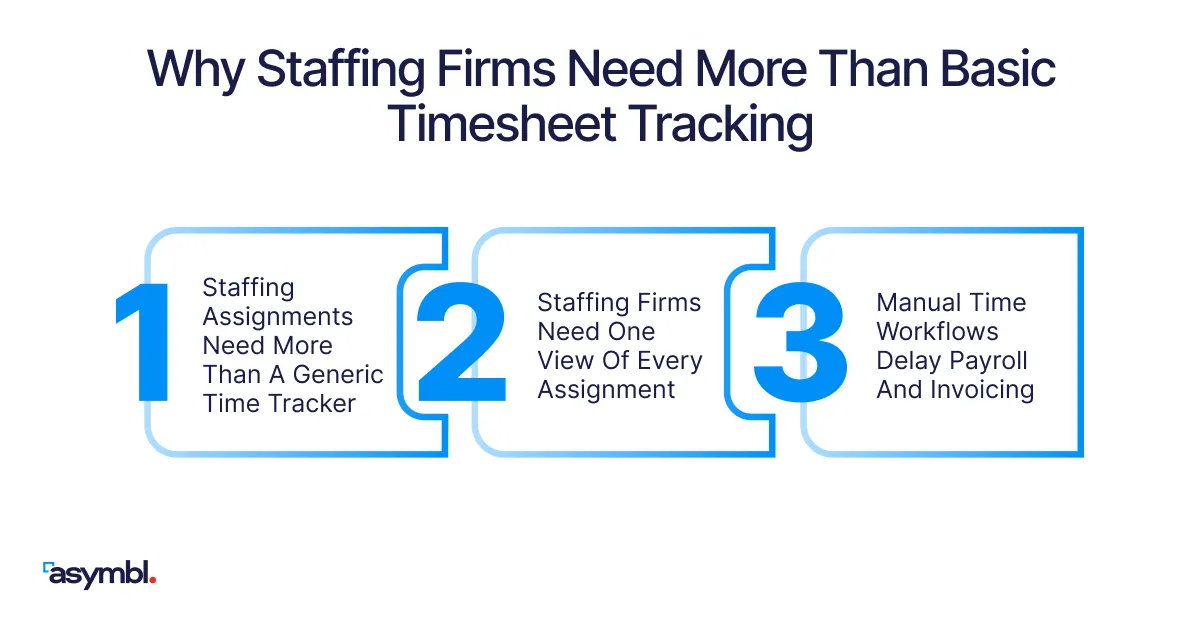
For your firm, a timesheet is a revenue document as well as a payroll record. Each approved hour connects contractor activity to the assignment, the client invoice, and your gross profit. Whether a basic tracker can carry that chain depends on details most buyers check late in the process.
Every Staffing Hour Carries Client and Rate Rules
Generic time trackers are built for a company's own employees. Staffing hours carry more, since every hour touches a client, a placement, and two rates. Timesheet software for staffing agencies has to handle:
- Temporary workers on rolling assignments
- Multiple client requirements at once
- Separate pay and bill rates on every hour
- Overtime rules that change by state
- Contract terms that differ by client
- Employer compliance obligations
Purpose-built staffing timesheet software handles that complexity with workflows designed around how staffing operations run. A staffing tool turns the same hours into a correct paycheck and a correct client invoice. The hours a temporary worker logs then feed billing directly, and your back office spends less time fixing them.
Staffing Firms Need One View of Every Assignment
Every team that touches an assignment needs the same record, since each one holds a different piece of it:
When worker, assignment, client, and time records live in disconnected systems, each team sees only its own piece. Finance bills at an old rate while the account manager's new rate lives in an email. In IBM's 2025 CEO Study of 2,000 CEOs, half said the pace of recent investment has left their business with disconnected, piecemeal technology. Connected timesheet data gives every team one view of each assignment, so you coordinate from the same facts.
Manual Time Workflows Delay Payroll and Invoicing
Manual time workflows add days to your time-to-invoice, from a finished workweek to a sent invoice. Spreadsheets, emailed timesheets, and approval follow-ups each add a step where an hour gets keyed wrong or a signature stalls.
In Deloitte's 2025 Global Payroll Benchmarking report, 21% of the 15 global companies surveyed ran off-cycle payroll to fix incorrect or missed payments.
Why Manual Time Processes Create Business Risk
The days lost to manual handoffs carry a cost beyond back-office effort. Each of those days adds to the payroll your firm funds before the client pays. The bigger exposure shows up in places your weekly payroll report rarely surfaces.
Disconnected Time Data Causes Missed Billable Hours
Disconnected time data causes missed billable hours, since every system handoff is a place for hours to go missing. Staffing revenue depends on hours moving accurately from contractor submission to approval, payroll, and client billing. Gaps between those steps lead to:
- Delayed invoices
- Billing disputes
- Inaccurate financial reporting
A timesheet the client approves late can miss the billing cutoff for the week. An overtime hour paid to the contractor can go unbilled to the client. Connected time data from placement to invoice lets you bill every approved hour and track each assignment's profit.
Manual Reconciliation Slows Billing and Obscures Margin
Manual reconciliation slows billing as finance teams match every approved hour against rate sheets and placement records first. Each mismatch between a pay rate, a bill rate, and the placement record becomes a task someone has to resolve. Finance then works to reconcile what was invoiced, what was paid, and what the applicant tracking system (ATS) shows.
Hours spent on discrepancies come out of collections, client reporting, and forecasting. The longer reconciliation runs, the longer days sales outstanding (DSO) stays high, and the later you see margin. Rules-based reconciliation matches hours to rates as they are approved. You then see where billing cycles slow down and where margin is lost.
What to Evaluate in Staffing Agency Timesheet Software
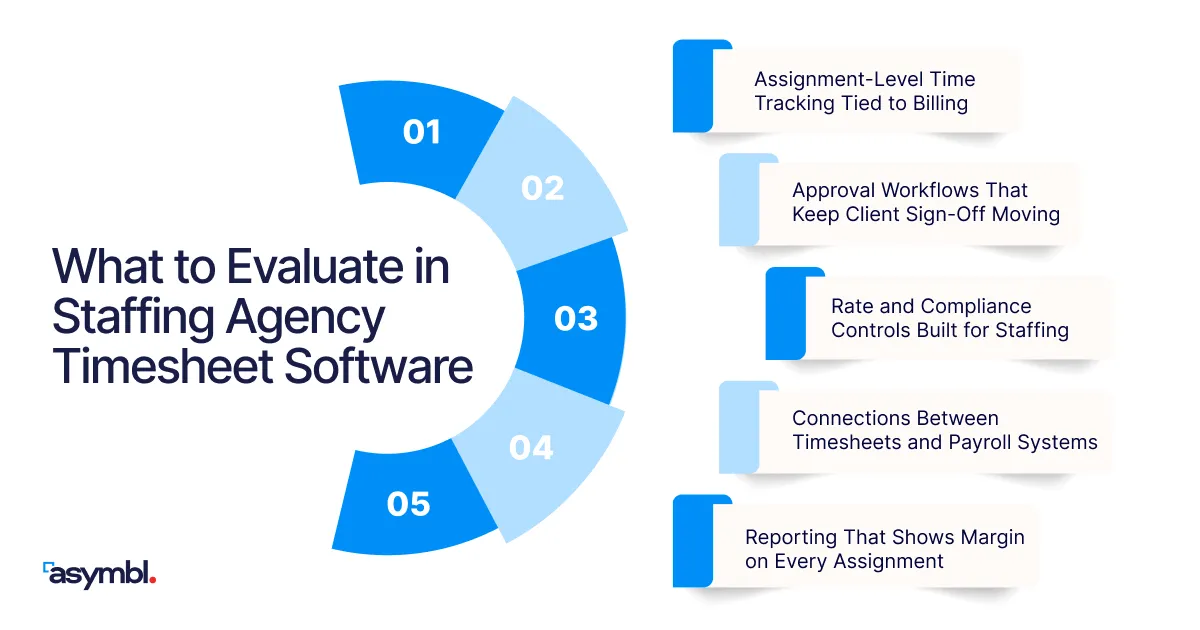
Missed hours and slow reconciliation trace back to specific failure points, and each one becomes a buying criterion. Choosing timesheet software for a staffing firm means testing how an approved hour reaches payroll, invoices, and reports. Vendor demos tend to sound alike, so bring these questions:
Assignment-Level Time Tracking Tied to Billing
Strong staffing timesheet software is built around the assignment, so every hour carries its billing context from the start. Assignment-level tracking connects the following in one record:
- Contractor information
- Client requirements
- Hours worked
- Billing details
- Engagement status
With everything in one record, your team follows each contractor's work from placement through assignment completion in one system. A contractor on two placements at different bill rates gets two clean timesheets, each tied to the right client. That multi-placement contractor is a useful case to see in a demo, since tools built around employees show their limits there first.
Approval Workflows That Keep Client Sign-Off Moving
Approval workflows keep client sign-off moving by routing each timesheet to the right approver the moment a contractor submits it. Approvals decide both payroll accuracy and billing speed, so strong approval workflows support:
- Contractor submissions from any device
- Client manager reviews
- Delegated approvers for vacations and coverage
- Exception handling for disputed or missing hours
Automatic routing and bulk approval cut manual follow-ups and speed up processing. Client managers approve a full week of timesheets in one sitting, and contractors get paid on time. Reminders by email or text keep a waiting timesheet in front of the approver.
Rate and Compliance Controls Built for Staffing
Rate and compliance controls apply the placement's pay rate, bill rate, and overtime rule to every approved hour. Staffing firms work across different worker arrangements, client agreements, and state regulations. Whether your firm places temps on weekly shifts or contractors on long assignments, the software needs to support:
- Pay rates
- Bill rates
- Overtime calculations by state
- Compliance tracking
- Audit records
The Fair Labor Standards Act (FLSA) sets the federal overtime baseline, and several states add their own daily overtime rules. Built-in rate rules calculate every hour correctly, so you pay contractors right and bill at the agreed markup. Audit records show who changed what and when, which keeps you ready for a wage and hour review.
Connections Between Timesheets and Payroll Systems
Timesheet software earns its place when it connects directly to payroll and billing systems. A standalone timesheet tool becomes one more data silo. Strong options connect time data with your ATS, payroll providers, and billing systems. Approved hours then move straight to payroll and invoicing.
Each handoff on shared data removes one place for a rate or an hour to go wrong. A placement confirmed in recruiting should update operations and feed billing right away. A timesheet tool that connects to your current payroll and billing provider lets you keep it, and your back office runs on fewer standalone tools.
Reporting That Shows Margin on Every Assignment
Reporting should show the margin on every assignment, alongside total hours worked. Staffing leaders need reports that cover:
- Contractor utilization
- Assignment profitability
- Approval delays
- Client performance
- Trends across the contractor base
Seen together, these numbers show which accounts carry your margin and where approval delays or rate errors reduce it. A client with strong volume can still return thin gross profit once overtime and slow approvals are counted. In Deloitte's 2024 Global Workforce Management Survey, only 50% of businesses said they track KPIs for timekeeping and scheduling. Deloitte links that gap to gaps in the data that let costs such as overtime climb.
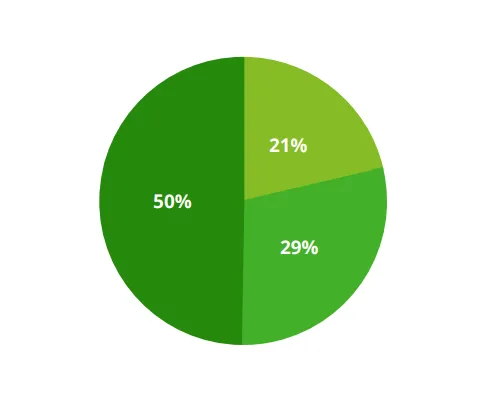
Source: 2024 Deloitte Global Workforce Management Survey
Turning Timesheet Data Into Staffing Decisions
Once reporting shows margin by assignment, your timesheet data starts to answer questions beyond payroll. Time data becomes more valuable when it lives beside the rest of your staffing records. Read together, the two point to decisions most firms still make on instinct.
Using Time Data to Plan Redeployment
Time data shows how each contractor performs and when they will be available, which makes it your earliest redeployment signal. That view comes from:
- Assignment history
- Hours patterns
- Client experience
- End dates
A contractor whose end date is two weeks out is close to being available for the next role. A contractor sitting between assignments is revenue walking away, so early redeployment keeps hours billing. Redeploying proven talent this way turns one-off placements into long-term relationships with contractors. Recruiters already know how these contractors perform, so the next placement moves faster.
Using Time Data to Improve Margin and Client Decisions
Timesheet data shows how each client account performs, which gives you a factual basis for rate, renewal, and terms decisions. Staffing firms can use it to:
- See assignment profitability
- Track margin changes over time
- Identify operational risks such as chronic late approvals
- Make better decisions about each client account
A client whose managers approve late every week stretches your cash flow gap, even at a healthy markup. An account with frequent overtime may justify a rate review at renewal. Decisions about rates, renewals, and client terms then rest on how assignments are performed. You walk into renewal conversations with data the client recognizes.
How Asymbl Connects Time Tracking to Placements
The criteria above are easiest to meet when time data and placement data live together. Asymbl is The Workforce Orchestration Company™, and we help staffing and recruiting firms bring people, AI, and software together as one hybrid workforce.
For time tracking, that means your timesheets live with the placements they come from, and each product below carries a different stage of the contractor cycle.
Asymbl Time: Time Capture and Approvals for Staffing
Asymbl Time is a Salesforce-based time tracking application built for staffing firms. It handles time capture, complex pay rules, multi-placement support, and approval workflows in the same place as recruiting.
Rate management covers:
- Location-based rates
- Shift differentials
- Overtime rules
- Mid-period adjustments
Approvers can bulk approve dozens of timesheets in seconds, and delegated approvers keep sign-off moving during vacations
Approved hours reach payroll and billing at the placement's rates, so billing cycles compress and your ops team spends less time on reconciliation.
Recruiter Suite: Placement and Time Data Together
Recruiter Suite is Asymbl's Salesforce-based staffing ATS. It connects sales, recruiting, and operations, so client relationships, job orders, and candidate activity share one record. Asymbl Time is built alongside Recruiter Suite, so placement data and time data live in the same place. Front-office users can see time, adjust it, and act on it before it locks into payroll. Recruiters see hours on active placements, so they answer contractor pay questions directly.
Leaders gain immediate visibility into revenue and gross profit by recruiter and team as placements are recorded. Today, Asymbl has deployed this operational foundation on Salesforce for two of the world’s largest staffing firms.
Talent Intelligence: Matching Talent for Redeployment
Talent Intelligence is an AI-first talent matching solution that finds the next assignment for contractors finishing their current one. It gives recruiters natural language search and context-aware matching across the firm's data, including:
- ATS records
- Resumes
- Interviews
- Feedback
- Placement outcomes
When time data shows an assignment wrapping up, recruiters use Talent Intelligence to match the contractor to new demand. Matches are based on fit, likelihood, and confidence. Recruiters can then line up the next assignment before the current one ends. Talent Intelligence learns from the data connected to it, including placement history and assignment performance, so its matches reflect what has worked for your firm
Asymbl Intelligence Platform: The Layer Behind Every Product
The Asymbl Intelligence Platform is the intelligence layer every Asymbl product and digital worker draws on. It enriches your firm's data and makes it usable across your ATS, CRM, email, and phone calls.
It captures the judgment and context that build up across every workflow and outcome, and makes that signal available to every worker. Time data adds to that picture, since hours, approval patterns, and assignment end dates show how each placement is going.
Choose Staffing Agency Timesheet Software That Grows With Your Placements
Staffing agency timesheet software decides how quickly a completed assignment becomes cash. It also decides how much margin survives the trip from timesheet to invoice. Firms that connect time data to their placements, approvals, and billing get paid sooner and spend less time on reconciliation. They also gain an early view of which contractors are ready for their next assignment.
Over a year, that record guides pricing for new accounts and redeployment planning. It also lets the same back-office team support more contractors.
A good first step is to measure your current time-to-invoice. From there, count the handoffs between a submitted timesheet and a sent invoice. Each handoff you remove gives your firm faster cash and clearer margin.
See how Asymbl Time keeps your timesheets and placements in the same place, so approved hours reach payroll and billing at the right rates.
FAQs
Staffing agency timesheet software is a system that captures contractor hours, routes them to client managers for approval, and sends approved time to payroll and billing. Each timesheet attaches to a specific placement, so the software applies the right pay rate, bill rate, and overtime rule to every hour. Staffing firms use it to pay contractors accurately and invoice clients on schedule.
Staffing timesheet software tracks hours across three parties, which are your firm, the contractor, and the client who approves the work. Regular time tracking software serves one employer tracking its own staff. Staffing tools add client approval routing, separate pay and bill rates, multi-placement timesheets, and client-specific contract terms. Every approved hour then becomes both a contractor paycheck and a line on a client invoice.
Staffing firms can usually keep their current payroll provider when they switch timesheet software. Many staffing time tracking tools connect to existing payroll and billing systems and pass approved hours straight through for processing. Ask each vendor which providers it supports and how hours transfer. Asymbl Time connects with a wide range of payroll and billing providers, so firms keep the back-office tools they already use.
Staffing timesheet software tracks hours that involve three parties: your firm, the contractor, and the client who approves the work. Regular time tracking serves one employer tracking its own staff. Staffing tools add client approval routing, separate pay and bill rates, and multi-placement timesheets, so each approved hour becomes both a paycheck and an invoice line.
Timesheet software shortens the gap between paying contractors and collecting from clients. Faster submission and client approval move invoices out earlier in each billing cycle, which lowers days sales outstanding. Accurate invoices also draw fewer disputes, so clients pay on their standard terms. For firms funding weekly payroll on 30-to-90-day client terms, each day saved on time-to-invoice frees up working capital.
A chief operating officer (COO) or chief financial officer (CFO) should measure current time-to-invoice, timesheet error rates, and approval cycle times before buying contractor timesheet software. Add the hours finance spends on reconciliation each week, the share of payroll runs that need corrections, and DSO by client. Those numbers set your baseline, so you can compare vendor claims against your own data and track the return after rollout.
Yes, staffing agency timesheet software supports contractor management when it ties each contractor's hours to their placement record. Firms can track assignment status, end dates, hours patterns, and approval history in one place. Recruiters see which contractors are finishing an assignment and ready for redeployment, and account managers see how each contractor performs at the client site. Compliance and audit records stay with the contractor's file.
Operations typically owns timesheet software day to day, since ops teams manage contractor submissions, client approvals, and exceptions. Finance owns the downstream rules, including pay and bill rates, payroll exports, and invoicing. Many staffing firms name a shared owner or a cross-functional team, so both groups work from the same approved hours. Recruiting leaders also benefit from visibility, since placement changes affect every timesheet.

Applicant Tracking System Problems: Why Your ATS Isn’t Working
Most ATS platforms weren’t built for the way staffing firms actually work. This blog breaks down the hidden flaws holding teams back—and how next-gen solutions like Asymbl’s are fixing them.

The Right Fit Starts With a Conversation.
See what working together could look like.